
There Must Be A Better Way!!!
Ever seen Avatar the last airbender..... before you can bend an element you need to understand the thing your bending, or when you are using certain super powers in other media or magic you have to understand the thing to actually really get good at it.
We know the Dom.... We know how to make API's now.... We get it, so now we can build upon that to finally become super coders, and be dangerously productive without being destructive....
Welcome to the world of a Full Stack Developer
Refactoring this in React would involve creating a functional component and using the useState hook to manage the state of the value. The useState hook is a built-in React hook that allows you to add React state to function components.
Here's a simple example of how you might refactor this using React and the useState hook:
import { useState } from "react";

function Counter() {
  const [value, setValue] = useState(0);

  const handleIncrement = (incrementValue) => {
    const newValue = value + parseInt(incrementValue, 10);
    setValue(newValue);
  };

  const handleDecrement = (decrementValue) => {
    const newValue = value - parseInt(decrementValue, 10);
    setValue(newValue);
  };

  return (
    <div>
      <h1>Please Add or Subtract</h1>
      <div className="board">
        <div id="value" style={{ color: value < 0 ? "red" : "black" }}>
          {value}
        </div>
        <div className="container">
          <button
            onClick={() =>
              handleIncrement(document.getElementById("number").value)
            }
          >
            +
          </button>
          <div className="value-form">
            <input type="number" id="number" defaultValue="0" />
          </div>
          <button
            onClick={() =>
              handleDecrement(document.getElementById("number").value)
            }
          >
            -
          </button>
        </div>
      </div>
    </div>
  );
}

export default Counter;
In this code:
- We create a functional component called
Counter. - We use the
useStatehook to create a state variablevalueand the functionsetValueto update it. - We define the
handleIncrementandhandleDecrementfunctions to increment and decrement thevaluestate respectively. - In our JSX, we display the value and two buttons "+" and "-". The text color of the value is determined by whether the value is less than 0.
- When the "+" button is clicked, the
handleIncrementfunction is called, which updates thevaluestate by adding the current input value to it. - When the "-" button is clicked, the
handleDecrementfunction is called, which updates thevaluestate by subtracting the current input value from it.
This code achieves the same functionality as the original JavaScript code, but it's more concise and easier to manage thanks to React's state management.
What does calling useState do? It declares a “state variable”. Our variable is called value but we could call it anything else, like banana. This is a way to “preserve” some values between the function calls. Normally, variables “disappear” when the function exits but state variables are preserved by React.
What do we pass to useState as an argument? The only argument to the useState() Hook is the initial state. Unlike with classes, the state doesn’t have to be an object. We can keep a number or a string if that’s all we need. In our example, we just want a number for how many times the user clicked, so pass 0 as initial state for our variable. (If we wanted to store two different values in state, we would call useState() twice.)
What does useState return? It returns a pair of values: the current state and a function that updates it. This is why we write const [value, setValue] = useState(0).
Framing
The best analogy to understand React state is to start by answering the following question: How are you feeling this very moment?
- Are you happy to be in class learning a new topic?
- Are you frustrated having to sit in class for the next several hours learning even more React?
- Did some random person say
helloout of the blue make you smile?
The answer to any one of those questions has a direct impact on your state of mind. A happy state will be reflected in your smile, tone of voice, being nice to others in return. An unhappy state will have the opposite effect.
As with all human beings our state of mind can change on the fly which is almost always reflected in our facial expressions or actions. Applications also have a state which is reflected in the UI presented to the user.
Therefore updating an applications state is our control mechanism for how we update the UI.
React, Components and The Virtual DOM


Students will be able to:
- Understanding Component Driven Development
- Understanding Declarative Programming
- Understand the Virtual DOM and it's purpose
- Understand React Dev Tools
- Build a Simple Todo List Application using Component Driven Development, Declarative Programming, The Virtual DOM, React Dev Tools
Seperation of Concerns
Separation of concerns in web development is the practice of breaking down a web application into distinct parts that each handles a separate concern, such as the user interface, business logic, and data access. This helps to improve maintainability, scalability, and reusability of the application.
Traditionally Frontend is seperated into
HTML: Structure
CSS: Presentation
JS: Functionality
A different way of Seperating Concerns with Component Driven Development
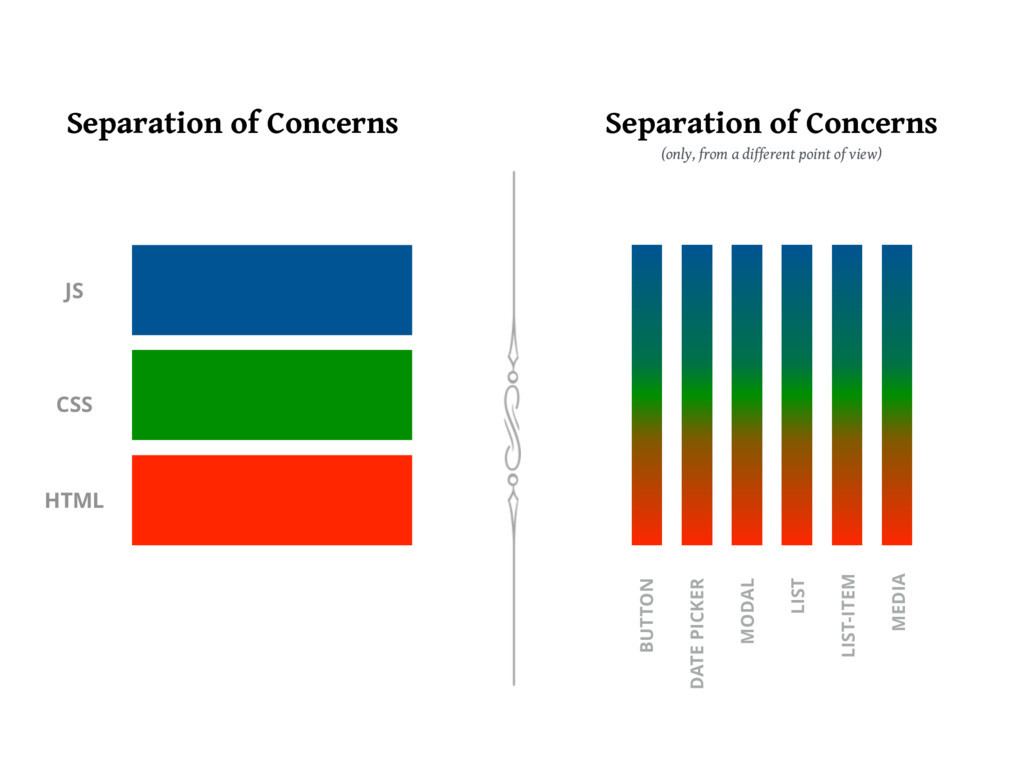
Component Driven Development
Click For More
Component Driven Development (CDD) is an approach to web development that makes use of reusable components to create a user interface. It is based on the React JavaScript library and is used to create interactive websites, mobile apps, and other user interfaces. React is a JavaScript library created by Facebook with a focus on performance and scalability.
CDD makes use of reusable components, or “widgets”, to create a user interface.
Each component is responsible for rendering a specific part of the user interface, and components can be composed together to create a complete user interface.
React components are written using JavaScript and the React library provides a set of tools to help developers create and manage components.
CDD also makes use of a declarative programming style, which makes it easier to write code that is easier to maintain and debug.
In addition, React's component-driven architecture encourages developers to write modular code, which makes it easier to reuse and update components.
Finally, React supports server-side rendering, which allows developers to create faster and more responsive user interfaces.
Component Driven Development is a powerful and efficient approach to web development that is based on the React JavaScript library. It makes use of reusable components and a declarative programming style to create user interfaces that are easy to maintain and debug. Additionally, React supports server-side rendering, which allows developers to create faster and more responsive user interfaces.
Declarative Programming
Click For More
Declarative programming is a programming style in React that focuses on describing the logic of a program, rather than describing the exact steps the program should take to reach a certain outcome. In React, this is achieved by using components, properties, and state.
Components are the basic building blocks of React, and are used to represent pieces of user interface. They are composed of HTML, JavaScript, and other languages, and can be reused in different parts of the application. Properties are used to provide data to components, while state is used to store data.
Declarative programming in React allows developers to focus on the logic of the program, rather than the implementation details. This makes it easier to create responsive, reusable, and testable components. It also allows for rapid development, since changes can be made without needing to rewrite the entire application.
Declarative programming in React is an efficient and powerful programming style that allows developers to focus on the logic of their program. It makes applications more responsive and easier to maintain, as well as allowing for faster development.
The Virtual DOM
Click For More
The Virtual DOM is a core concept of React, a JavaScript library used to create user interfaces. The Virtual DOM is a JavaScript representation of the actual DOM, or Document Object Model, which is the tree structure of HTML elements in a web page. The Virtual DOM allows React to make changes to the DOM without having to reload the page or redraw the page.
The Virtual DOM works by creating a virtual representation of the current DOM and comparing it to the desired state of the DOM. When a change is made, React runs a diffing algorithm which looks for differences between the virtual DOM and the actual DOM. The diffing algorithm then determines which parts of the DOM need to be changed and updates only those parts, instead of having to redraw the entire page. This makes changes to the DOM faster and more efficient.
React's use of the virtual DOM also allows developers to write more efficient code. Instead of having to write code to manipulate the DOM directly, developers can use React's declarative API to describe the desired state of the DOM, and React will handle the rest. This makes it easier for developers to create complex user interfaces and makes their code less prone to errors.
The Virtual DOM is a core concept of React that allows it to make changes to the DOM without having to reload the page or redraw the page. It works by creating a virtual representation of the current DOM and comparing it to the desired state of the DOM, and then updating only the parts that need to be changed. This makes it faster and more efficient to make changes to the DOM, as well as easier for developers to create complex user interfaces.
React Developer Tools
Click for More
React Developer Tools is a browser extension for Chrome and Firefox that allows users to inspect and debug React components in their applications. The tool allows developers to see the components, props, state and hierarchy of their React app in an interactive way. It also provides helpful features such as the ability to find components by name, view their source code, and edit them in the browser.
To install React Developer Tools, first open the Chrome Web Store, then search for “React Developer Tools”. The extension should appear in the search results. Click “Add to Chrome”, then confirm the installation. Once the installation is complete, the React Developer Tools icon should appear in the Chrome toolbar. We will be using the Components Tab in the React Dev Tools.
The React Developer Tools extension is an invaluable tool for React developers. It allows developers to easily inspect and debug their components, as well as view their props, state and hierarchy. With these features, React developers are able to more quickly identify and fix problems in their apps.
For a new React Learner looking to develop React applications, the React Developer Tools extension is a must-have. With its intuitive interface and helpful features, the extension will provide a wealth of information that can be used to debug and optimize applications. Furthermore, installation is quick and easy, making it a great addition to any React developer’s workflow.
Thinking In React
Click For More
Thinking in React is a concept developed by Facebook to help web developers build user interfaces (UI) more efficiently. It is a component-based approach that focuses on breaking down UI elements into small, reusable components. This allows developers to break down complex tasks into individual, simple parts that can be reused as needed. The main idea behind Thinking in React is to think of the UI as a set of components, or small pieces, that can be moved around, modified, and reused.
Thinking in React requires developers to break down an application into smaller components, each of which has its own state. State is data that is stored within a component, such as a user’s name or what items are in their shopping cart. By breaking down an app into smaller components, developers can more easily manage application state and make sure that updates only affect the component that needs updating.
The Thinking in React approach also encourages developers to use one-way data flow. This means that data flows from parent components to child components, rather than from child components to parent components. This helps keep components independent and makes it easier to debug and maintain an application.
Thinking in React is a great tool for building efficient, reusable user interfaces. It encourages developers to break down complex applications into small, reusable components and to use one-way data flow to keep components independent. This helps developers create robust applications quickly and easily.
The useState Hook
The useState hook allows us to generate variables that are special, as updating them would trigger your component and its children to update.
First step is always importing the useState hook.
import { useState } from "react"Inside the body of your component function you can then initiate a state variable. The name convention is "state" for the variable and "setState" for the function that updates the states value.
If I wanted to create state for a counter it would look like this.
// initiate counter at 0, setCounter let's me update counter
const [counter, setCounter] = useState(0)
So a simple counter component would look like this...
import { useState } from "react"

export default function Counter(props) {
  // Declare the state
  const [counter, setCounter] = useState(0)

  // Function to add one to the state
  const addOne = () => {
    // sets counter to its current value + 1
    setCounter(counter + 1)
  }

  // The h1 display the counter and button runs addOne function
  return (
    <div>
      <h1>{counter}</h1>
      <button onClick={addOne}>Click Me to Add One</button>
    </div>
  )
}
That's as simple as it gets. What happens when the button is clicked.
- setCounter is passed the current value + 1
- React then compares this new value to the old value of counter
- If they are the same, React does nothing (beware of references as values when it comes to objects and arrays, make sure you understand pass by value vs pass by reference remeber the
arthurshouse taraleeshouse example from unit 1) - If they are different then React updates its VirtualDOM based on a re-render of the component and its children
- It then compares the virtualDOM to the real browser DOM and only updates the places in which they differ.
The above process is why variables that are "State" are reactive, meaning the DOM will updates when the value updates. All other variables are not reactive and will not trigger updates when changed.
NOTE: If the state is an object or array, make sure you pass a new array or object and not just modify the old one. Objects and Arrays are reference types, so if you pass the old array with modified values the references will still be equal so there will be no update to the DOM.
Example...
Don't do this
// modify the existing state
state[0] = 6
// then setState as the existing state, triggering NO update
setState(state)
also don't do this
// these two variables are both pointing to the same position in memory
const updatedState = state
// no update is triggered
setState(updatedState)
Do this
// create a unique copy of the array
const updatedState = [...state]
// modify the new array
updatedState[0] = 6
// set the State to the updatedArray, DOM will update
setState(updatedState)