
How The Web Works
Terminal Objectives
- Explain the steps of the web development process.
- Map the request and response cycle.
- Identify key web concepts to increase web and ux fluency.
- Explain Full-Stack Web Development
- Describe Client/Server Architecture
- Explain the Anatomy of HTTP Requests and Responses
- Identify the Two Key Components of an HTTP Request
- Explain How HTTP Requests Can be Initiated From a Browser
- Explain How HTTP Requests Result in Code Running on a Server
- Describe a Process for Building a Full-stack App
- List the Fundamental Capabilities of Web Frameworks
- Create a Basic Express Web App
- Define Basic Routes
- Respond to HTTP Requests
- Render Dynamic Views
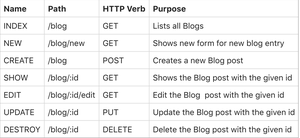
- Describe REST and list the various routes
- Create an Index route
- Install JSONView to make viewing JSON easier
- Create a Show route
- Enhance the data in your data array
- Define MVC and explain why it matters
- Move our data into a separate file
- Move our presentation code
Why Learn About The Web?
Let’s say you were hiring someone to redo your kitchen.
Would you work with them if they…
...didn’t know which materials were best to use?
...couldn’t explain what needed to be done?
...didn’t communicate with the construction team?
As an engineer, it’s important to know how designs become a website or app.
How do your choices affect the end product?
What project and technology constraints exist?
What is your role in the development process?
Client/Server Architecture

-
The terms client and server can refer to both a physical device (computer, tablet, phone, etc.) but can also refer to a software process. For example:
- Database software such as PostgreSQL and web servers like Apache are examples of software processes behaving as servers.
- Browser software such as Chrome or Firefox are examples of software clients.
- Physical servers connected to the Internet are also referred to as hosts.
- Web developers usually think of a "web browser" when they hear "client".
- Note that during development, your computer will plays the role of BOTH client and web server, but eventually when you deploy industry standard applications (UNIT 3), you will completely decouple your front end and back end
Server Client Relationship

Let’s say you went to a restaurant for dinner and were seated in the dining room.
You decide to order a burrito from the items listed on the menu.
Server/Client Relationship
A waiter takes your burrito request, brings it to the chef, and then returns with your food when it’s ready.

The chef knows that ‘burrito’ is shorthand for a more complicated subset of requests.
It means transforming things such as meat and vegetables using heat, knives, and other tools.
They’ll need lots of ingredients from a pantry or freezer to complete your request.

Once the chef has made your burrito, the waiter brings it to you in the dining room. Now you can make another request.

And That's How The Internet Works

The Client
The dining room is your computer —the client.
When you open Twitter, for example, you’re presented with a menu of options.
This is where the front-end shows up (HTML, CSS, and JavaScript).

The Server
The kitchen is known as the server.
Servers run software designed to serve content instead of consume it (the way your laptop and phone do).

The Backend
The chef and pantry/freezer make up the back-end.
Their job is to take raw data and package it into recognizable pieces.

The Router
To move that data from a remote server to your local client, you’ll need a router.
A router is a package of code that sends and receives information between your computer and the website you’re attempting to load.

Visual Representation

Full Stack Development

Intro to Express
Beginning with the End in Mind
Setup
This unit we will be building 2 applications together The Fruits App and The Captain's Log. Then you will build a Pokemon Mini Project & Mongoose Store App in breakout rooms and Culminate with a Blog Project that you will present. Fruits will be turned in at the end of the Unit so make sure you follow along.
- Create a folder called
itbeginsand then change into it
$ mkdir itbegins
$ cd itbegins- Create a file inside this folder called
server.js
$ touch server.js- Make three folders
$ mkdir models views controllers- Then create a
package.jsonand accept the defaults using this command:
$ npm init -y- Open the project's folder in VS Code.
The Three Fundamental Capabilities of Web Application Frameworks
-
Web Application Frameworks have three capabilities fundamental to writing a back-end web application:
- The ability to define routes
- The ability to process HTTP requests using middleware
- The ability to use a view engine to render dynamic templates
- Over the next few lessons, you will learn about how the Express framework implements these three fundamental capabilities.
Express Framework - Intro
- Express is the most popular web framework for Node.js.
- It is minimalistic and lightweight, especially when compared to massive frameworks like Django and Rails.
- Express uses Node's built-in HTTP module to listen for, and respond to, HTTP requests - Express simply adds those three web application capabilities on top of Node
Install the Express Module
-
Let's use
npmto install the Express module in this project:$ npm i expressNote that
iis a shortcut forinstall
Express - Hello World!
-
Let's write the obligatory "Hello World!" application:
// Load express
const express = require('express');

// Create our express app
const app = express();

// Define a "root" route directly on app
// Tomorrow, we'll use best practice routing
app.get('/', function (req, res) {
  res.send('<h1>Hello World!</h1>');
});

// Tell the app to listen on port 3000
// for HTTP requests from clients
app.listen(3000, function () {
  console.log('Listening on port 3000');
});
-
Run the app:
$ npm start - Browsing to
localhost:3000will hit our app's root route that we defined and return "Hello World!". - Using DevTools, we will find that despite just sending back the text of
<h1>Hello World!</h1>, the browser "built" a minimal HTML document to display it in. - The
sendmethod is a general purpose way to respond to the request, however, soon we'll be using more specific methods.
Basic Structure of Express App
- Here is a helpful outline of what a typical Express app does - let's put this guide right in our
server.js:
// Require modules
const express = require('express');

// Create the Express app
const app = express();

// Configure the app (app.set)


// Mount middleware (app.use)


// Mount routes
app.get('/', (req, res) => {
  	res.send('<h1>Hello World!</h1>');
});

// Tell the app to listen on port 3000
app.listen(3000, function() {
 console.log('Listening on port 3000');
});
Our First Route
-
Let's replace the content we just sent from our route with something else.
// Mount routes app.get('/', (req, res) => { res.send('<h1>Hello Express</h1>'); }); - Refreshing the page will reveal that it didn't work! This is because we have to restart the server, or...
Nodemon
nodemonis a popular development tool used for automatically restarting our Express app when we save changes.- lets go to
package.jsonand update thescriptsobject - lets add a new key to the object that says
"dev": "nodemon" - Now, thanks to the
mainkey inpackage.json, we can start the server by simply typingnpm run dev. - Now lets stop the server currently running with
npm startby typingctrl + cand then runnpm run dev - Let's move on to routing...
Our First Route (Cont)
- Like most web frameworks, Express uses the
HTTP Methodand thePathof the HTTP request to match a route defined in the application. - In our first route, we defined a route using the
getmethod on the Expressappobject. - The
getmethod defines a route that listens for aGETrequest. There are other methods such aspost,putanddelete, that map to the other HTTP verbs. - The first argument provided to
app.get,/, defines the path for the route. In this case the root of the application, i.e., just the host name likelocalhost:3000. - In Express, all strings used to define a path should start with a forward-slash character (
/). - In tomorrow's Express lesson, we'll learn a preferred way of defining routes using the Express
Routerobject, but you need to be aware of defining routes this way as well.
The Route's Callback
-
The second argument provided to
app.get()is a callback function:app.get('/', (req, res) => { res.send('<h1>Hello From My App</h1>'); }); - Express will execute route's callback function only when a matching HTTP request (HTTP Method + Path) is received.
-
The route's callback function:
app.get('/', (req, res) => { res.send('<h1>Hello From My App</h1>'); });defines two parameters:
req&res req: Represents Express's request object, andres: Represents Express's response object- Express provides those two objects as arguments when it invokes the callback.
- The
requestobject has properties and methods used to access information regarding the current HTTP request, including any data being sent from the browser. - The
responseobject contains properties and methods used to end the request/response cycle - like we've done so far using theres.sendmethod.
Practice - Define Another Route (3 mins)
- Define another route that matches a
getrequest to a path of/homethat sends a text response of<h1>Home Page</h1>. - Test it by browsing to
localhost:3000/home.
Review Question - Routing
- Is it okay to define more than one route on the same path?
For example:
app.get('/my-first-route', (req, res) => {
  res.send("Here's a list of fruit...");
});

app.post('/my-first-route', (req, res) => {
  res.send('Thanks for buying a fruit!');
});
Ways to Respond to a Request
- So far we have responded in our route handler (callback) code by using the
res.sendmethod. - The Express docs for the Response object explains the other ways to respond to the HTTP request.
-
Here are the methods we'll use the most:
res.render()- Render a view template and send the resulting HTML to the browser.res.redirect()- Tell the browser to issue anotherGETrequest.res.json()- Send a JSON response (used when we build an API).
Rendering A View
const fs = require('fs') // this engine requires the fs module like we did Saturday
app.engine('donna', (filePath, options, callback) => { // define the view engine called donna
  fs.readFile(filePath, (err, content) => {
    if (err) return callback(err)
    // this is an extremely simple view engine we'll be more complex later
    const rendered = content.toString()
      .replace('#title#', `<title>${options.title}</title>`)
      .replace('#message#', `<h1>${options.message}</h1>`).replace('#content#',`<div>${Array.isArray(options.content)? options.content.map(item => `<li>${item}</li>`) : options.content }</div>` )
    return callback(null, rendered)
  })
})
app.set('views', './views') // specify the views directory
app.set('view engine', 'donna') // register the donna view engine
After the code above
-
Make a file called
template.donnain theviewsfolder<head> #title# </head> <body> <header>#message#</header> #content# </body>
Then in the server.js
app.get('/', (req, res) => {
  res.render('template', { title: 'I am DJ Khaled', message: 'We The Best!', content: 'All I Do is Win' })
})

app.get('/about-me', (req, res) => {
  res.render('template', { title: 'DJ KHALED', message: 'It Breaks My Heart!', content: 'They Ain\'t Believe in Us But God Did' })
})

app.get('/another-one', (req, res) => {
  res.render('template', { title: 'We The Best', message: 'Who The Best! We!!!', content: 'We Taking Over, Major Key Alert, Y\'all know who it is, All I do is win, God Did!!!' })
})
View the following links in the browser
http://localhost:3000/http://localhost:3000/about-mehttp://localhost:3000/another-one
Essential Questions Back to The Professionalism
❓ When we define routes in a web app, we are mapping HTTP requests to ____.
❓ What method do we call to render a view and on what object does that method exist?
Soooo What the heck are we learning the next 6 weeks Arthur?

- CRUD: CRUD stands for Create, Read, Update, Delete. It's a way of remembering the four basic functions that you need for working with any data in a system. Think of CRUD like a to-do list. You can create a new task, read the tasks you already have, update a task you've already created, and delete a task you no longer need.
- REST: Representational State Transfer, or REST, is an architectural style for creating web services. A RESTful API uses HTTP requests to GET, PUT, POST, and DELETE data. It's like a menu at a restaurant. Each endpoint (or "dish") represents a specific resource that can be accessed and manipulated using standard HTTP methods.
- MVC: MVC stands for Model-View-Controller. It's an architectural pattern used in software development. The model represents the data, the view is the user interface, and the controller handles the logic and communication between the model and the view. MVC is like a chef in a kitchen. The chef separates the different aspects of preparing a meal (the model, the view, and the controller) and assigns specific tasks to each aspect.
- Server-side Rendering (SSR): Server-side rendering is when your webpage is built on the server each time someone makes a request for a page. This is how many traditional webpages work. It's like a chef preparing a dish in the kitchen before bringing it out to the customers.
- Client-side Rendering (CSR): Client-side rendering is when the webpage is created in the browser using JavaScript. The server sends a response with an HTML file that's practically empty and then JavaScript kicks in to load the content. It's like a customer at a habachi restaurant ordering a dish and then being able to see the food prepared in front of them.
- Consuming an API: Consuming an API is like ordering food at a restaurant. You make a request to an API to retrieve or manipulate data. The API then sends back the appropriate response, just like a server bringing your dish to the table.
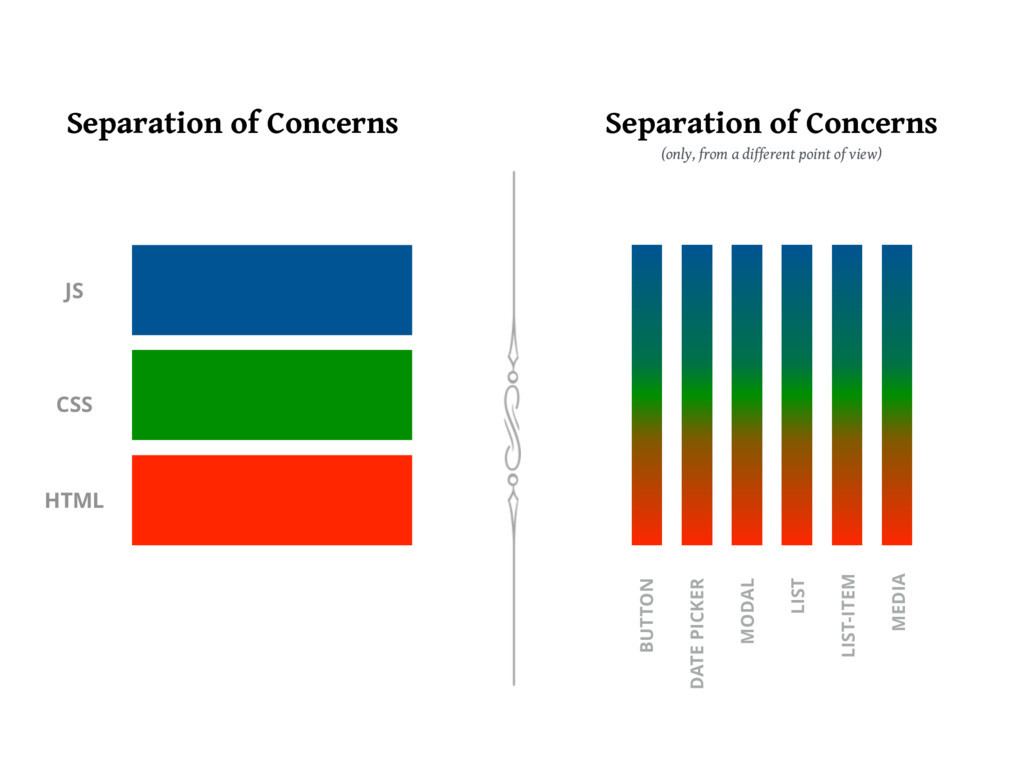
- Separation of Concerns: Separation of concerns is about keeping different parts of your code separate so that they each do one thing. It's like a chef having different stations in the kitchen. Each station is responsible for a specific task.
- Component-Driven Development: Component-driven development is a method in which the application is built from individual, reusable components. Each component has its own logic and controls its own rendering. It's like building with LEGOs. Each LEGO piece represents a component, and you can use different components to build different things.
- Client-Server Model: The client-server model is a communication structure that separates tasks or workloads between providers (servers) and service requesters, called clients. It's similar to a game of chess where the client, like the player, makes requests and the server, like the opponent, receives requests and responds.
- IP Address: An IP address is a unique string of numbers separated by periods that identifies each computer using the Internet Protocol to communicate over a network. It's like the street address for your computer on the vast internet neighborhood.
- Port: A port on a computer is like a doorway. It provides access to specific services or applications running on the device. Each port corresponds to a specific function and directs different types of internet traffic to the appropriate service or application.
- DNS: DNS stands for Domain Name System. It's like the phone book of the internet. Instead of remembering IP addresses, DNS servers give us human-friendly names like 'google.com'.
Remember, these are quite simplified definitions. Each of these topics is much deeper when you dig into them, but this gives you a basic understanding.
Building a REST API with Express.js
Let's create a simple REST API for a collection of "books" using Express.js.
Here's the step-by-step process:
Step 1: Setting up the project
First, let's create a new directory for our project and initialize a new Node.js project:
mkdir books-api
cd books-api
npm init -y
Step 2: Installing Express
Next, let's install Express:
npm install expressStep 3: Creating our Express application
Now, we can start writing our Express application. Create a new file named app.js, and add the following code:
const express = require('express');
const app = express();
const port = 3000;

app.listen(port, () => {
  console.log(`Server running on http://localhost:${port}`);
});
Step 4: Adding Middleware
We'll use the built-in Express middleware for parsing JSON:
app.use(express.json());Step 5: Creating a "books" resource
Let's create a simple array to hold our books and add some basic routes to manage them. Add the following code to app.js:
let books = [];

// Get all books
app.get('/books', (req, res) => {
  res.json(books);
});

// Add a new book
app.post('/books', (req, res) => {
  books.push(req.body);
  res.status(201).json(req.body);
});

// Get a specific book
app.get('/books/:id', (req, res) => {
  const book = books.find(b => b.id === parseInt(req.params.id));
  if (!book) return res.status(404).json({message: "Book not found"});
  res.json(book);
});

// Update a book
app.put('/books/:id', (req, res) => {
  const book = books.find(b => b.id === parseInt(req.params.id));
  if (!book) return res.status(404).json({message: "Book not found"});

  Object.assign(book, req.body);
  res.json(book);
});

// Delete a book
app.delete('/books/:id', (req, res) => {
  const index = books.findIndex(b => b.id === parseInt(req.params.id));
  if (index === -1) return res.status(404).json({message: "Book not found"});

  books.splice(index, 1);
  res.sendStatus(204);
});
Step 6: Running our API
Now, you can run your API using the following command:
node app.jsYour server is now running, and you can use a tool like Postman or cURL to send HTTP requests to http://localhost:3000/books. You'll be able to add, view, modify, and delete books.
This is a basic example and does not include persistent storage or error handling. In a real-world application, you would typically use a database to store your data, and you would add comprehensive error handling to your routes. We'll get there.